Welcome to OfflineMOT’s documentation!



OfflineMOT is a Python package for multiple objects tracking from bird-view drone stationary videos. The accuracy has priority over runtime in this package, therefore it is better suited for offline processing rather than real time applications, hence the name of the package.
A pretrained Yolo network is used for detection in this package and it should be trained separately. The network included with this library is Yolo v4 in a pytorch format (trained to detect pedestrians, cyclists and cars). The loading and running of Yolo model is done with the help of scripts taken from this project (All of them are in offlinemot/tool subfolder)
Example output for a sample video, taken from Vehicle-Crowd Interaction (VCI) - CITR Dataset :
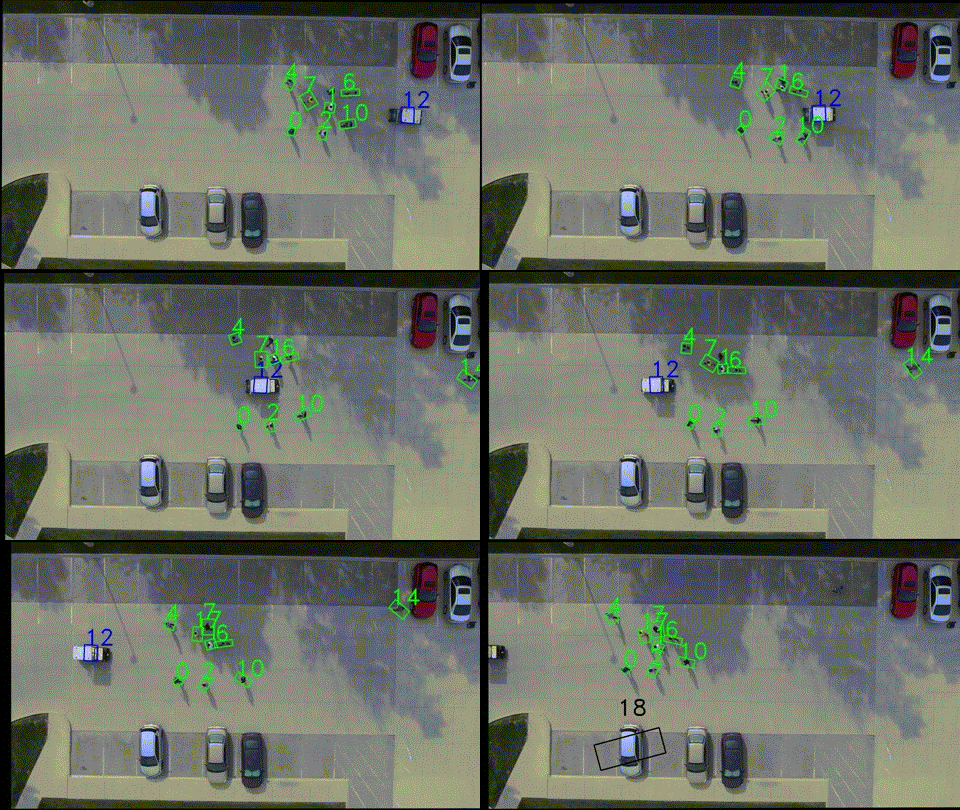
Features of this work:
Drone videos are subject to some random movements due to a few factors like noise in the control or wind. For that, a fixing step for all the affected frames is needed.
Additionally, running the detection for every frame is slow and can be substituted by the usage of a background subtracting method to detect all moving objects. If the video is stationary (like the assumption here) then the background can be easily found for the whole video.
At the end and because the work is offline, additional filtering steps can be done to find:
The true size of each object in pixel (which should be the same since it is taken from bird’s eye view)
The orientation of all the objects in each frame
The smooth trajectories of each tracked object in the scene.
All of this are implemented here benefiting from the specific features of the problem, namely (bird’s eye view, offline and stationary camera)
Workflow
Three methods are applied for the detection and tracking in this project. They are, in the order of their priority (from lowest to highest):
Background Subtraction: This method is used on every frame to detect the foreground objects which contain any moving object. If these objects are already tracked then nothing happen. Otherwise, it would be added and tracked as candidate objects (white boxes)
Tracking with a filter like KCF (Kernelized Correlation Filter), which only needs the first bounding box of the object to track. These objects will continue to be tracked as long as the tracker keep giving results successfully. Otherwise, the object will not be updated to a new position and a detection step is performed.
Detection with a network model like Yolo: This is performed only for every N frame as set in the
config.pyfile . If the object is already tracked then it is confirmed and set to a class type, otherwise nothing happens (only a message saying that something is detected but wasn’t there previously)
All these three steps are done for every object and the result is recorded for every frame. If one object keeps failing all the steps then it will be deleted after a defined number of times.